
Making a random choice sounds easy until you actually need to do it fairly.
Who should present first? What should the team work on next? Which student should answer the question? What should everyone eat for dinner? Who wins the giveaway?
For situations like these, a random wheel can turn a small decision into something visual, transparent, and surprisingly fun.
WheelGenerator is a browser-based spin wheel and random picker designed for exactly that purpose. It allows users to create customizable wheels, add their own choices, spin for a random result, and reuse or share the wheel without creating an account.
Instead of trying to become a complicated productivity platform, WheelGenerator focuses on one simple job and gives users enough customization to make that job useful across classrooms, games, giveaways, work sessions, and everyday decisions.
What Is WheelGenerator?
WheelGenerator is a free online random wheel generator.
At its most basic, the workflow is extremely simple:
- Add a list of choices.
- Customize the wheel if desired.
- Click the spin button.
- Let the wheel select a result.
The choices can represent almost anything: names, numbers, foods, tasks, colors, questions, challenges, destinations, or ideas.
Because it runs directly in the browser and does not require registration, users can start creating a wheel almost immediately.
That low-friction experience is one of the project's biggest strengths.
Build a Custom Wheel in Seconds
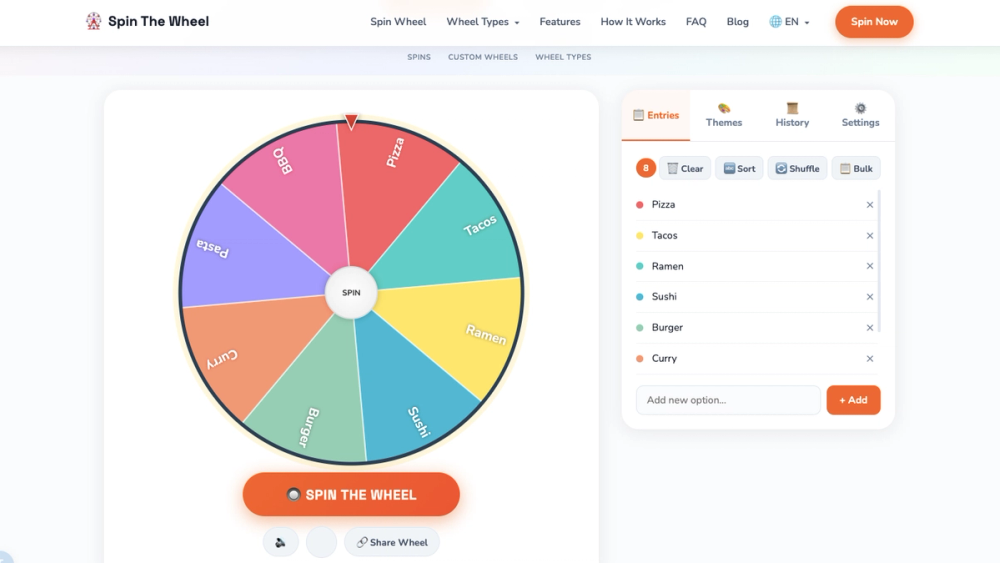
The main interface centers around an editable list of entries.
Users can add individual options manually or paste many choices at once with the bulk import feature. This makes the tool practical not only for a five-item dinner picker but also for classroom lists, contest participants, brainstorming topics, or longer collections.
Entries can also be sorted or shuffled before spinning.
The wheel updates as choices are changed, so there is no separate setup or configuration process. You edit the list and the wheel is ready.
According to the project, WheelGenerator can handle more than 100 entries while automatically adapting text sizing for longer lists.
For most everyday random-selection tasks, that is more than enough capacity.
Ready-to-Use Presets
Not every wheel needs to be created from scratch.
WheelGenerator includes several presets for common scenarios, including:
- Food Picker
- Yes/No Oracle
- Number Wheel
- Color Wheel
- Days of Week
- Truth or Dare
These presets make the tool especially useful for casual users who simply want a quick decision.
If you cannot decide what to eat, for example, you can start with a food wheel. If a game needs a random challenge, the Truth or Dare option provides a starting point. For simple binary decisions, a Yes/No wheel can turn an ordinary choice into something more playful.
Custom wheels remain available for situations where the presets are not enough.
Themes Make the Wheel More Personal
A random picker does not technically need visual customization, but presentation matters when a tool is being used with students, audiences, friends, or livestream viewers.
WheelGenerator includes several visual themes such as:
- Classic
- Neon
- Pastel
- Dark
- Rainbow
- Earth
Changing the theme alters the appearance of the wheel without changing its contents.
This small feature makes the application more flexible for different environments. A colorful theme might work well for a classroom or party, while a darker theme may fit a presentation or streaming setup.
The project also includes optional sound effects and winning fanfares, adding some extra feedback when the wheel is spinning and when a result is selected.
Spin History
WheelGenerator keeps a history of previous results.
This can be useful when running multiple rounds because users do not need to remember every result manually.
Imagine using a wheel to select speakers during a meeting. After several spins, the history provides a quick record of who was chosen.
The same feature can help during:
- classroom activities,
- multiple-round games,
- brainstorming sessions,
- raffles,
- random task selection.
The history can also be cleared when users want to start over.
Automatically Remove Selected Entries
One of the most practical settings is Remove entry after spin.
When enabled, the selected result disappears from the wheel after being chosen.
This turns WheelGenerator from a simple random picker into a lightweight elimination tool.
Consider a giveaway with ten participants. After the first winner is selected, that person can automatically be removed before the next spin. The same approach works for tournaments, classroom participation, task assignments, or any situation where repeated results are undesirable.
Without this feature, users would have to manually delete each selected entry.
Automating the process makes multi-round selection much smoother.
Share a Custom Wheel
WheelGenerator also allows users to share their configured wheel.
Instead of sending someone a list of entries and asking them to rebuild it, users can prepare the wheel first and share it directly.
This expands the tool beyond personal decision-making.
A teacher could create a classroom activity and distribute it to students. A team leader could prepare a task-selection wheel before a workshop. A content creator could share a themed wheel with their audience.
For lightweight web utilities, shareability is particularly valuable because it allows the configuration itself to become reusable content.
Useful in the Classroom
Education is one of the clearest applications for a tool like WheelGenerator.
Teachers can place student names on a wheel and randomly choose who answers a question.
They can also create wheels containing:
- discussion topics,
- vocabulary words,
- quiz questions,
- writing prompts,
- presentation order,
- classroom activities.
Random selection can add variety to classroom participation while making the selection process visible to everyone.
Instead of the teacher quietly choosing someone, students can watch the wheel determine the result.
The visual element also turns a routine classroom action into a small interactive event.
Giveaways and Random Winners
WheelGenerator can also function as a simple giveaway spinner.
Contest organizers can paste participant names into the wheel and spin to choose a winner.
With automatic removal enabled, multiple winners can be selected without duplicates.
This approach works particularly well for informal raffles, community events, social media giveaways, and small online contests where participants benefit from seeing a visible selection process.
For regulated lotteries, high-value competitions, or scenarios requiring independently audited randomness, specialized systems may still be necessary. WheelGenerator is better understood as a convenient general-purpose random picker.
Team Selection and Task Assignment
Randomness can occasionally be useful at work too.
When several equally reasonable options exist, teams can use a wheel to avoid spending unnecessary time debating them.
For example, a wheel might contain:
- review documentation,
- test the latest build,
- prepare a demo,
- investigate a bug,
- write release notes.
It can also be used to choose a meeting facilitator, presentation order, brainstorming topic, or team leader.
Random selection should not replace thoughtful management decisions, but for low-stakes choices it can be an effective way to move forward quickly.
Everyday Decision Making
Some of the best use cases are much simpler.
What should you eat tonight?
Which movie should you watch?
Which game should your group play?
Where should you go this weekend?
What task should you tackle first?
Instead of repeatedly debating similar options, users can add them to a wheel and let the spinner decide.
The visual interaction makes the process feel more satisfying than generating a random number or asking a generic randomizer.
That is one reason spin wheels remain popular despite being based on an extremely simple idea.
Mobile-Friendly Design
WheelGenerator is designed to work on mobile devices as well as desktop browsers.
Users can interact with the wheel using touch controls, making it suitable for situations where a laptop is unnecessary.
This is especially useful for parties, classrooms, informal meetings, trips, and game nights.
A random picker works best when it is immediately accessible, and mobile support helps preserve that simplicity.
No Account Required
Another notable design decision is the absence of mandatory registration.
Users do not need to create an account before building or spinning a wheel.
There is no onboarding process between arriving at the page and using the core functionality.
For a single-purpose utility, this matters.
Many online tools add accounts, dashboards, workspaces, subscriptions, and onboarding flows even when the basic task takes only a few seconds. WheelGenerator takes the opposite approach: the primary interaction is available immediately.
The project states that wheel data remains in the browser, reinforcing its lightweight, local-first experience.
A Good Example of a Focused Web Utility
From a product-design perspective, WheelGenerator is interesting because its value does not come from technical complexity.
Its core idea could be summarized in one sentence:
Put some options on a wheel and randomly choose one.
The project becomes more useful by adding features around that single interaction:
- custom entries,
- bulk importing,
- presets,
- multiple themes,
- sound effects,
- spin history,
- automatic result removal,
- wheel sharing,
- mobile support.
None of these features changes the fundamental concept. Instead, each one removes friction from a real use case.
That is a good example of how small web tools can evolve.
A successful utility does not always need dozens of unrelated capabilities. Sometimes it simply needs to handle one common task extremely well.
Why Random Wheels Are Still Useful
There are countless ways to produce a random result programmatically, but a wheel offers something a plain random-number generator does not: visibility.
Everyone involved can see the available options.
Everyone can see the wheel move.
And everyone can see where it stops.
That makes random selection easier to understand and more engaging.
The spinning animation also introduces a moment of anticipation. For games and entertainment, that is part of the experience. Even in classrooms or team activities, it can make an ordinary selection process feel more interactive.
WheelGenerator builds around this simple psychological advantage.
Final Thoughts
WheelGenerator is a straightforward tool with a surprisingly broad range of applications.
It can help teachers select students, creators run giveaways, teams assign simple tasks, friends choose games, families decide what to eat, and individuals break small decision-making deadlocks.
Its strongest qualities are simplicity and accessibility.
Users can open the page, add their options, customize the appearance, and start spinning without registering for an account or learning a complicated interface.
Features such as bulk entry, presets, themes, history tracking, automatic removal, sound effects, sharing, and mobile support give the project enough flexibility to handle considerably more than a basic random picker.
WheelGenerator is also a useful reminder that a web project does not need to solve a massive problem to be valuable.
Sometimes a focused tool that removes a few seconds of friction—and makes the experience a little more fun—is exactly what users need.