Depth of field is one of the most important concepts in photography, but it can also be one of the hardest to understand.
Photographers often hear rules such as:
- A wider aperture creates a shallower depth of field.
- A longer focal length can make backgrounds appear more blurred.
- Moving closer to a subject reduces the in-focus range.
- Smaller sensors behave differently from full-frame cameras.
- Hyperfocal focusing can help keep more of a landscape sharp.
All of these ideas are useful, but they can feel abstract when they are presented only as formulas or tables.
Depth of Field is a small open-source web project that takes a much more visual approach. Instead of simply calculating a near-focus distance and far-focus distance, it lets users interactively change camera settings and immediately see how those settings affect the focus zone.
The result is part calculator, part simulator, and part photography learning tool.
What Is Depth of Field?
Depth of field describes the range of distances in a scene that appear acceptably sharp.
Imagine photographing a person.
If the person's eyes are sharp while the background quickly becomes blurry, the image has a relatively shallow depth of field.
If the person, nearby objects, and distant background all appear reasonably sharp, the image has a deeper depth of field.
Several camera variables influence this range, including:
- Aperture
- Focal length
- Subject distance
- Sensor size
- Circle of confusion
The problem is that these variables interact with one another.
Changing from f/1.8 to f/8 can dramatically increase the focus range. Moving the camera closer to the subject can reduce it again. Switching sensor formats changes the assumptions behind the calculation.
A traditional depth-of-field calculator gives you the final numbers.
This project tries to show you what those numbers actually mean.
An Interactive Depth-of-Field Simulator
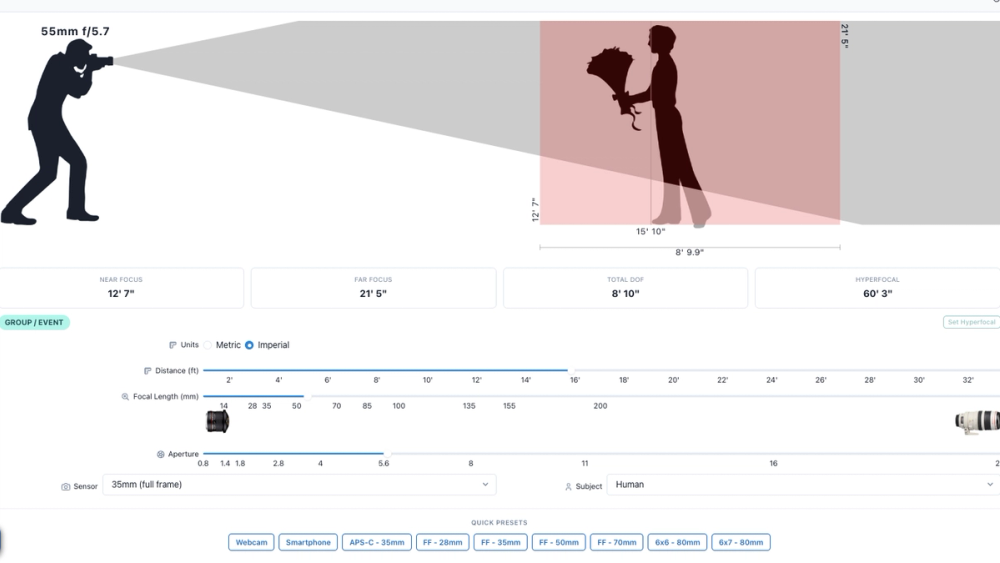
The main interface lets users adjust several important camera parameters.
These include:
- Distance to subject
- Focal length
- Aperture
- Sensor format
- Measurement system
As the values change, the application recalculates the depth of field in real time.
The key output includes values such as:
- Near focus limit
- Far focus limit
- Total depth of field
- Hyperfocal distance
That alone would make it a useful photography calculator.
However, the most interesting part of the project is the visual representation.
The interface displays the camera, subject, viewing angle, and focus region graphically. Instead of reading that the focus range extends from one distance to another, users can see that area change as they move the controls.
This makes experimentation much easier.
Set the aperture to f/1.4 and the sharp region becomes narrower.
Stop down to f/11 and the region expands.
Change from a wide-angle lens to a longer telephoto focal length and the geometry changes again.
For someone learning photography, that feedback is much easier to understand than a table full of numbers.
Understanding Aperture Visually
Aperture is one of the most common controls photographers use to manipulate depth of field.
A wide aperture such as:
- f/1.4
- f/1.8
- f/2
usually produces a shallower depth of field.
A smaller aperture such as:
- f/8
- f/11
- f/16
usually increases the range that appears sharp.
The simulator makes this relationship immediately visible.
Instead of memorizing the rule, users can move the aperture control and watch the focus zone grow or shrink.
This can be especially useful for photographers learning portrait photography, where small changes in focusing distance and aperture can determine whether only the eyes are sharp or the entire face remains in focus.
Comparing Focal Lengths
Focal length is another major part of the simulation.
Users can experiment with settings such as:
- 24mm
- 35mm
- 50mm
- 85mm
- 200mm
The application also calculates the camera's field of view based on focal length and sensor dimensions.
This is important because lens behavior is not just about depth of field.
A 24mm lens and an 85mm lens create very different compositions, viewing angles, and spatial relationships.
By showing both focus information and viewing geometry, the project feels closer to a simple camera optics simulator than a basic depth-of-field calculator.
For beginners comparing lenses, this makes the tool particularly useful.
You can explore how a 35mm lens differs from a 50mm or 85mm lens without physically owning all of them.
Support for Different Sensor Formats
Sensor size is another concept that can confuse new photographers.
The project includes multiple sensor presets, such as:
- Smartphone
- Webcam
- APS-C
- Micro Four Thirds
- 35mm full frame
- Medium format
Each sensor format has different dimensions and a different crop factor.
The simulator uses this information when calculating field of view and depth of field.
For example, a 50mm lens mounted on an APS-C camera produces a narrower field of view than the same focal length on a full-frame camera.
The project can also display the approximate full-frame equivalent focal length.
That makes it easier to understand statements such as:
A 50mm lens on a 1.5× crop sensor gives a field of view similar to roughly 75mm on full frame.
This is a common topic in photography forums, lens reviews, and camera buying guides, so having an interactive way to explore it is valuable.
Custom Sensor Sizes
The simulator is not limited to common consumer camera formats.
It also supports custom sensor dimensions.
Users can enter a custom width and height, allowing the application to estimate values such as:
- Sensor diagonal
- Crop factor
- Circle of confusion
This makes the project useful beyond normal DSLR and mirrorless photography.
It can potentially help users experiment with unusual imaging systems, webcams, industrial cameras, mobile devices, or specialized sensors.
For developers and technically minded photographers, this flexibility makes the project more interesting than a calculator built around a fixed list of cameras.
Hyperfocal Distance
Another notable feature is hyperfocal distance calculation.
Hyperfocal distance is particularly important in landscape, street, and architectural photography.
In simplified terms, it is a focusing distance that allows photographers to maximize how much of the scene remains acceptably sharp, extending toward infinity.
The simulator calculates this distance automatically and includes a control for setting the focus distance directly to the hyperfocal point.
This turns what can be an intimidating photographic concept into something users can experiment with visually.
Change the focal length.
Change the aperture.
Watch the hyperfocal distance move.
That makes it easier to understand why wide-angle lenses stopped down to smaller apertures are often favored when photographers want a large zone of acceptable sharpness.
Diffraction Awareness
The project also acknowledges an important tradeoff.
Closing the aperture increases depth of field, but extremely small apertures can introduce diffraction.
Diffraction reduces fine image sharpness as light bends around the edges of the aperture opening.
The application estimates diffraction behavior and can warn when the selected aperture may begin to produce visible softness relative to the sensor's assumed circle of confusion.
This is a useful detail because it prevents users from learning an overly simplistic rule such as:
Smaller aperture is always better for sharpness.
Photography is usually about balancing competing factors.
You may want more depth of field, but stopping down too far can reduce overall detail.
The simulator helps expose that tradeoff.
Useful Presets for Experimentation
To make the tool easier to explore, the project includes preset combinations for familiar cameras and lenses.
These include configurations representing setups such as:
- Smartphones
- Webcams
- APS-C cameras
- Full-frame cameras
- Medium-format cameras
There are also several common focal lengths.
Presets make the simulator more approachable because users do not need to understand every technical setting before getting started.
Someone interested in portrait photography can load a full-frame 50mm configuration, while another user can compare it with a wider 28mm setup.
From there, the controls can be adjusted freely.
A Useful Tool for Learning Photography
The strongest use case for the project is education.
A normal depth-of-field calculator answers:
What is my depth of field?
This simulator also helps answer:
Why did my depth of field change?
That difference matters.
Users can isolate individual variables and experiment.
For example:
- Keep focal length and distance constant.
- Change only the aperture.
- Observe the focus range.
Then:
- Keep aperture constant.
- Increase focal length.
- Observe what changes.
Then:
- Keep the lens settings unchanged.
- Move closer to the subject.
- Compare the new focus zone.
This kind of experimentation makes abstract photography concepts much easier to learn.
It could be useful for photography students, teachers, bloggers, YouTube creators, or anyone trying to understand camera optics more deeply.
A Simple Open-Source React Project
From a development perspective, Depth of Field is also a good example of a focused browser-based application.
The project is built with technologies including:
- React
- TypeScript
- Vite
- Chakra UI
- Framer Motion
The architecture is straightforward.
User controls update application state, mathematical formulas derive camera and focus values, and the results are rendered as an interactive visual interface.
There is no need for a complicated backend or user account system.
That simplicity makes the source code approachable for developers who want to learn how to build interactive educational tools.
It demonstrates a useful pattern:
user input → mathematical calculation → visual feedback
The same design idea could be applied to many other subjects, from optics and physics to finance, engineering, or geometry.
More Than a Depth-of-Field Calculator
There are many depth-of-field calculators online.
Most of them are designed primarily to provide numerical results.
Depth of Field takes a slightly different approach.
Its main strength is visualization.
By combining camera settings, sensor formats, depth-of-field formulas, field-of-view calculations, hyperfocal distance, and interactive graphics, it becomes a lightweight camera-learning simulator.
It is especially useful for people who prefer experimenting rather than reading formulas.
Photographers can use it to understand lens behavior.
Beginners can learn the relationship between aperture, focal length, and distance.
Teachers can use it to demonstrate optical concepts.
Developers can study it as a compact React and TypeScript project built around real-world mathematics.
For a relatively small open-source application, it manages to explain a surprisingly complex photography topic in a simple and intuitive way.
If you have ever wondered why changing your lens, aperture, camera position, or sensor format affects background blur and focus depth, this project provides an excellent environment for exploring those relationships yourself.