The early 2000s are making a comeback, and their unmistakable photography style is everywhere. From flash-heavy party pictures to grainy digital camera selfies, the Y2K aesthetic has become a popular way to give modern photos a nostalgic personality.
But recreating that authentic 2000s look doesn't require an old digital camera, expensive editing software, or complicated presets.
With a Y2K Photo Editor, you can transform ordinary pictures into nostalgic, early-digital-style images directly in your browser.
One tool worth exploring is Filtora Y2K Photo Editor, a free online editor that lets you customize flash, grain, colors, and framing without downloading an app or creating an account.
In this guide, we'll explore what makes Y2K photography distinctive, how Filtora works, and how to create your own retro-inspired photos in just a few steps.
What Is a Y2K Photo Editor?
A Y2K Photo Editor is a photo editing tool designed to recreate the visual characteristics associated with photography from the late 1990s and early 2000s.
Unlike modern smartphone photography, which often emphasizes sharpness, balanced exposure, and computational image enhancement, early digital cameras produced images with more noticeable imperfections.
Those imperfections have become an essential part of the Y2K aesthetic.
Typical Y2K photo effects include:
- Direct flash photography: Bright highlights and a spontaneous party-camera appearance.
- Digital grain and noise: Subtle imperfections reminiscent of older digital cameras.
- Vibrant colors: Saturated tones that give pictures a playful, nostalgic personality.
- Soft image details: Less polished sharpness compared with contemporary smartphone photography.
- Faded shadows: Slightly washed-out dark areas that create a vintage digital feeling.
- Casual framing: Cropped selfies, candid portraits, and imperfect compositions.
A good Y2K editor combines these characteristics while allowing users to adjust the intensity of the effect.
That's precisely what Filtora aims to provide.
Meet Filtora: A Free Online Y2K Photo Editor
Filtora Y2K Photo Editor is a browser-based photography tool designed to recreate the look of early-2000s digital pictures.
Instead of relying on a single fixed preset, it provides several editing controls that let users customize the final result.
The editor is available at:
https://filtora.app/y2k-photo-editor
One of its biggest advantages is accessibility.
You don't need to install software, register an account, or purchase credits to start editing.
Simply open the editor, upload an image, and experiment with different retro effects.
Key Features
1. Three Y2K Style Presets
Filtora offers three starting intensities:
- Light: A subtle Y2K aesthetic suitable for everyday photographs.
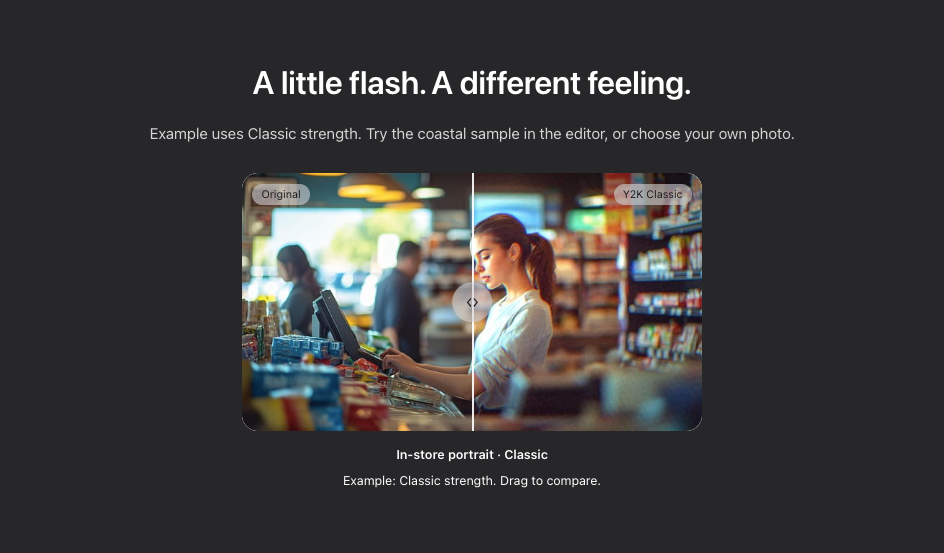
- Classic: A balanced retro look inspired by early digital photography.
- Heavy: A stronger nostalgic effect with more noticeable stylistic changes.
These presets provide a convenient starting point without restricting further customization.
2. Adjustable Flash Effect
Direct flash is one of the most recognizable elements of Y2K photography.
Filtora includes a simulated flash effect that adds brightness and glow, helping recreate the spontaneous feeling of photos taken with compact digital cameras.
3. Customizable Grain and Color
Users can adjust grain, brightness, contrast, and saturation independently.
This makes it possible to create anything from a clean, lightly nostalgic portrait to a more heavily textured digital-camera-style image.
4. Built-In Cropping and Rotation
The editor supports square, portrait, story, and landscape framing.
You can also rotate or mirror your image without switching to another editing application.
5. Before-and-After Comparison
An interactive comparison divider lets you inspect the original and edited versions of your photo.
This is particularly useful when adjusting subtle effects.
6. Free Downloads Without Watermarks
Finished photos can be downloaded as JPG or PNG files without watermarks.
Depending on your device, exports support dimensions up to 4096 pixels on the longest side.
How to Create Y2K Photos Online
Using Filtora is straightforward, even if you've never edited a photo before.
Step 1: Upload Your Photo
Open the Y2K Photo Editor and choose an image from your device.
Supported formats include JPG, PNG, and WebP, with a maximum upload file size of 10 MB.
You can also try the sample photograph before editing your own images.
Step 2: Choose Your Y2K Look
Select Light, Classic, or Heavy.
For beginners, Classic is a useful starting point because it introduces the retro appearance without requiring detailed adjustments.
Step 3: Experiment With Flash and Grain
Enable the flash effect to give your picture a brighter, more spontaneous appearance.
Then adjust the grain level.
For a nostalgic digital camera look, try combining moderate grain with flash and slightly reduced contrast.
The ideal settings will depend on the original lighting and subject.
Step 4: Adjust Colors and Composition
Fine-tune brightness, contrast, and saturation until you achieve the atmosphere you want.
Crop the image for its intended purpose.
A square crop works well for profile pictures, while a tall crop may be more appropriate for social media stories.
Step 5: Download Your Finished Photo
Use the comparison slider to check your final edit.
Once you're satisfied, export your picture as a JPG or PNG.
Your edited photo is ready to share.
Why Is the Y2K Photo Aesthetic Popular?
The renewed interest in Y2K photography reflects a broader fascination with early-internet culture, nostalgic fashion, and retro digital technology.
In an era when smartphone photos are often highly processed, the imperfections of older cameras can feel refreshing.
The Appeal of Digital Nostalgia
Early digital photography had a distinctive character.
Unexpected flash, imperfect exposure, and visible noise were once technical limitations. Today, these qualities have become creative choices.
Y2K photo editing allows people to recreate that feeling without needing vintage hardware.
A More Casual Photography Style
Many Y2K-inspired images emphasize spontaneity rather than perfection.
A flash-lit mirror selfie or casually framed group photo can feel more personal than a carefully polished portrait.
This aesthetic works particularly well for casual social media content, fashion photography, and nostalgic photo collections.
Retro Meets Modern Creativity
Y2K photography also pairs naturally with other early-2000s design elements.
Think metallic typography, glossy graphics, cyber-inspired layouts, and playful color combinations.
A Y2K Photo Editor can provide the photographic foundation for these creative projects.
Y2K Photo Editor vs. Y2K Photo Filter: What's the Difference?
Although these terms are often used interchangeably, there's a practical distinction.
A Y2K photo filter typically applies a predefined visual style to an image.
It's convenient when you want a quick transformation with minimal adjustments.
A Y2K Photo Editor, meanwhile, gives you more creative control over the final appearance.
With Filtora, you can independently adjust:
- Flash intensity and appearance through its flash controls
- Grain and digital noise
- Brightness, contrast, and saturation
- Image framing and orientation
- Overall preset strength
This makes the editor particularly useful for users who want to recreate a specific style instead of simply applying a one-click effect.
Filtora also offers a simpler Y2K filter experience for users who prefer fewer editing controls.
Best Ways to Use a Y2K Photo Editor
The Y2K aesthetic works across many types of photography.
1. Retro Profile Pictures
Transform a modern selfie into a nostalgic digital-camera portrait.
Experiment with flash and moderate grain to recreate an early-2000s profile picture aesthetic.
2. Instagram and TikTok Photos
Create retro-inspired images for social media posts, stories, and photo collections.
The editor's cropping controls help prepare images for different formats.
3. Fashion Photography
Y2K effects complement outfits inspired by early-2000s fashion.
Flash photography and vivid colors can emphasize accessories, textures, and playful styling.
4. Party and Nightlife Photos
Nighttime photographs are especially suitable for direct-flash aesthetics.
Adding grain and adjusting contrast can help recreate the atmosphere of compact-camera party photography.
5. Creative Collages and Mood Boards
Edited images can be used in digital collages, nostalgic scrapbooks, and early-internet-inspired graphic designs.
Combine them with retro typography or other design elements in your favorite design application.
Is Filtora Y2K Photo Editor Really Free?
Yes. According to Filtora, its Y2K Photo Editor is free to use, including editing controls and JPG or PNG downloads.
There are several practical benefits:
No account required: You can begin editing without creating a profile.
No watermark: Exported pictures do not include a mandatory branding overlay.
No installation: The editor works directly in a compatible web browser.
No daily editing limit: The tool does not impose a daily quota on its editing features.
On-device processing: Your selected photo is processed locally in your browser rather than uploaded to Filtora's servers.
The privacy aspect is especially useful for people who prefer not to upload personal photographs to online image-processing services.
However, the tool requires a browser with WebGL support. Performance and maximum export dimensions can vary depending on your device.
Editing sessions are temporary, so remember to download your finished image before closing or refreshing the page.
Tips for Creating Better Y2K Aesthetic Photos
A successful Y2K image is more than just a strong filter.
Here are a few practical techniques.
Start with a suitable photograph. Casual portraits, candid moments, and nighttime pictures are often good candidates for retro effects.
Don't overuse grain. A small amount of texture can create nostalgia without unnecessarily obscuring details.
Experiment with flash. Direct-flash styling can dramatically change the mood, especially for portraits and indoor scenes.
Keep some imperfections. Perfectly balanced lighting isn't always necessary for a convincing Y2K-inspired image.
Compare different strengths. Try Light, Classic, and Heavy before committing to one look.
Most importantly, treat the Y2K aesthetic as a creative starting point rather than a rigid set of rules.
Frequently Asked Questions
What is the best free Y2K Photo Editor online?
Filtora is an option worth trying if you want customizable Y2K effects, browser-based editing, and free watermark-free downloads without registration.
Can I make my photos look like they were taken in 2000?
Yes. Combining simulated direct flash, grain, color adjustments, and softer contrast can help recreate characteristics associated with early digital camera photography.
Can I use a Y2K Photo Editor on my phone?
Filtora supports mobile browsers with the required graphics capabilities. You can select a compatible image from your phone and download the edited result.
Does Filtora use AI to generate Y2K photos?
The Y2K Photo Editor applies visual adjustments to existing images rather than generating new pictures with AI. Its editing operations run locally in your browser.
Can I create Y2K photos without downloading an app?
Yes. Browser-based editors like Filtora let you upload, edit, and export images without installing a dedicated application.
Final Thoughts: Bring the 2000s Aesthetic Back to Your Photos
The Y2K aesthetic captures a distinctive moment in digital photography, when bright flash, visible grain, and imperfect colors gave everyday pictures a recognizable personality.
Modern editing tools make that visual style accessible without the need for vintage cameras or complicated software.
Filtora Y2K Photo Editor stands out as a straightforward option for anyone who wants to experiment with nostalgic photography online.
With adjustable presets, flash, grain, color controls, cropping tools, and free watermark-free exports, it offers a practical way to create personalized Y2K-inspired pictures.
Whether you're creating a retro profile picture, refreshing your social media photography, or exploring early-2000s visual culture, a Y2K Photo Editor can help you turn an ordinary photo into something nostalgic and expressive.
Try Filtora Y2K Photo Editor and give your next photograph a touch of digital nostalgia.