

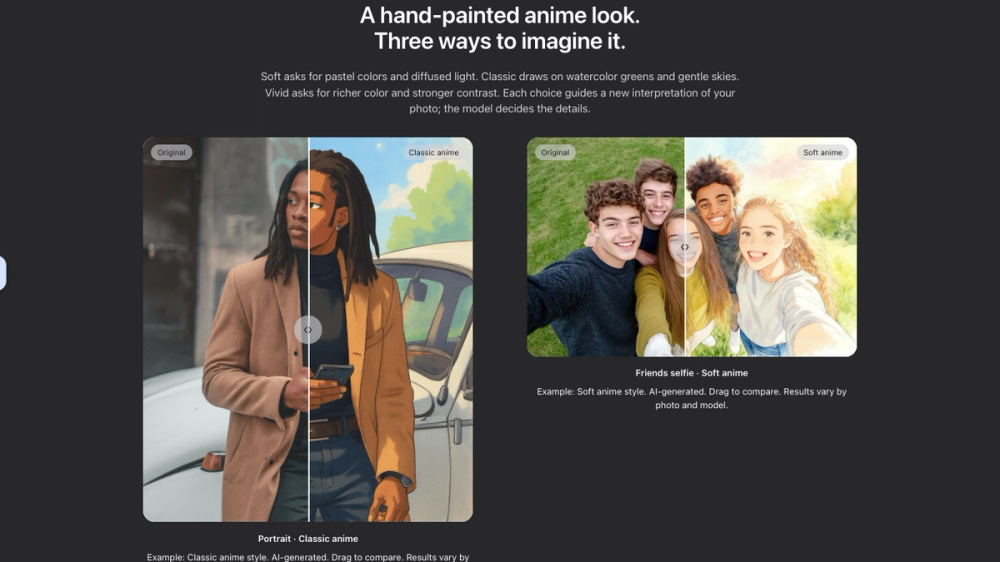
Filtora AI Ghibli Filter is an AI-powered photo transformation tool that turns ordinary pictures into dreamy, hand-painted anime-style artwork. Inspired by the soft colors, watercolor landscapes, and warm lighting associated with classic Japanese animation, it offers an easy way to reimagine portraits, pets, and scenery.
Key Features
- AI Ghibli-Style Photo Transformation: Convert everyday photos into painterly anime illustrations featuring soft edges, watercolor textures, gentle skies, and cinematic lighting.
- Three Artistic Styles: Choose from Soft for pastel colors and diffused lighting, Classic for watercolor greens and nostalgic scenery, or Vivid for richer colors and stronger contrast.
- Multiple AI Models: Select from Seedream 4, Flux Kontext Pro, and Max to explore different artistic interpretations.
- Subject-Aware Editing: AI aims to preserve your original subject and composition while transforming the visual style, although facial features and background details may vary.
- Interactive Before-and-After Comparison: Compare your original photo with its AI-generated anime version using an intuitive image comparison slider.
- Simple Photo Upload: Supports JPG, PNG, and WebP images up to 10 MB, making it suitable for portraits, pet photos, landscapes, and street photography.
- Privacy-Conscious Workflow: Photos remain on your device until generation. Submitted images are processed through Replicate, where API data is removed after one hour by default.
- Credit-Based Generation: Generate images using 3, 4, or 8 credits depending on your selected AI model. Google sign-in is required.
How to Use the AI Ghibli Filter
- Sign in with your Google account and upload a photo.
- Choose Soft, Classic, or Vivid and select an AI model.
- Confirm image-processing permission and start generation.


